
ISO 27001 Annex A 8.7 Protection Against Malware is a security control that mandates a multi-layered defence strategy to prevent, detect, and recover from malicious software. It requires the implementation of Endpoint Detection and Response (EDR), automated updates, and user awareness training to ensure business continuity and data integrity across the organization.
In this guide, I will show you exactly how to implement ISO 27001 Annex A 8.7 and ensure you pass your audit. You will get a complete walkthrough of the control, practical implementation examples, and access to the ISO 27001 templates and toolkit that make compliance easy.
I am Stuart Barker, an ISO 27001 Lead Auditor with over 30 years of experience conducting hundreds of audits. I will cut through the jargon to show you exactly what changed in the 2022 update and provide you with plain-English advice to get you certified.
Key Takeaways: ISO 27001 Annex A 8.7 Protection Against Malware
ISO 27001 Annex A 8.7 requires organizations to implement a holistic defense-in-depth strategy to prevent, detect, and recover from malware. While many assume this control is just about installing antivirus, the standard mandates a combination of technical tools (like EDR), administrative policies, and human awareness training. The goal is to protect all information assets from malicious software like viruses, ransomware, and spyware.
Core requirements for compliance include:
- Holistic Endpoint Protection: You must deploy enterprise-grade antivirus or Endpoint Detection and Response (EDR) across all applicable devices (Windows, Mac, and Linux).
- Automated Updates: Security software must be configured to update definitions and signatures automatically. You must be able to prove that 100% of your devices are current.
- User Awareness & Training: Technical tools are not enough. You must provide regular training to employees on how to spot phishing, avoid malicious websites, and handle suspicious attachments.
- Restricted Installation Rights: Users should generally not have administrative rights to install unauthorized software (Shadow IT), which is a primary entry point for malware.
- Detection & Response: You must have the ability to detect a malware event, isolate the infected device, and follow a documented Incident Response plan.
Audit Focus: Auditors will look for “The Management Console”:
- Centralised Control: They will want to see your centralized antivirus dashboard to verify that all laptops/servers are “Healthy” and up-to-date.
- Records of Action: “Show me a log of a blocked malware attempt from the last 90 days. Who was notified and what was the follow-up?”
- Human Evidence: They will check your training logs to ensure every employee has completed a malware awareness module within the last 12 months.
The Malware Defence Stack (Layers of Control):
| Defence Layer | Purpose | Example Technology |
|---|---|---|
| Email Security | Catching threats before they arrive. | Spam & Phishing Filters (e.g., Mimecast). |
| Network Security | Blocking malicious domains. | Web Filtering / Firewalls. |
| Endpoint Security | Stopping the malware execution. | EDR / Managed Antivirus. |
| Human Layer | Preventing the initial “click.” | Phishing Simulations & Training. |
| Recovery Layer | Falling back if all else fails. | Immutable Backups (Ransomware protection). |
Table of contents
- Key Takeaways: ISO 27001 Annex A 8.7 Protection Against Malware
- What is ISO 27001 Annex A 8.7?
- ISO 27001 Annex A 8.7 Free Training Video
- ISO 27001 Annex A 8.7 Explainer Video
- ISO 27001 Annex A 8.7 Podcast
- ISO 27001 Annex A 8.7 Implementation Guidance
- How to implement ISO 27001 Annex A 8.7
- Malware Defence Stack
- How to pass an ISO 27001 Annex A 8.7 audit
- Top 3 ISO 27001 Annex A 8.7 mistakes and how to avoid them
- Applicability of ISO 27001 Annex A 8.7 across different business models.
- Fast Track ISO 27001 Annex A 8.7 Compliance with the ISO 27001 Toolkit
- ISO 27001 Annex A 8.7 FAQ
- Related ISO 27001 Controls
- Further Reading
- ISO 27001 Controls and Attribute Values
- ISO 27001 Annex A 8.7 Mind Map
- ISO 27001 Annex A 8.7 Strategic Briefing Slides
ISO 27001 Certainty™: The Ultimate ISO 27001 Certification System & Toolkit

What is ISO 27001 Annex A 8.7?
ISO 27001 Annex A 8.7 is about protection against malware which means you must install antivirus software and train people to raise user awareness.
ISO 27001 Annex A 8.7 Protection Against Malware is an ISO 27001 control that looks to make sure you understand malware in all its forms and take a holistic approach to protecting against it.
ISO 27001 Annex A 8.7 Purpose
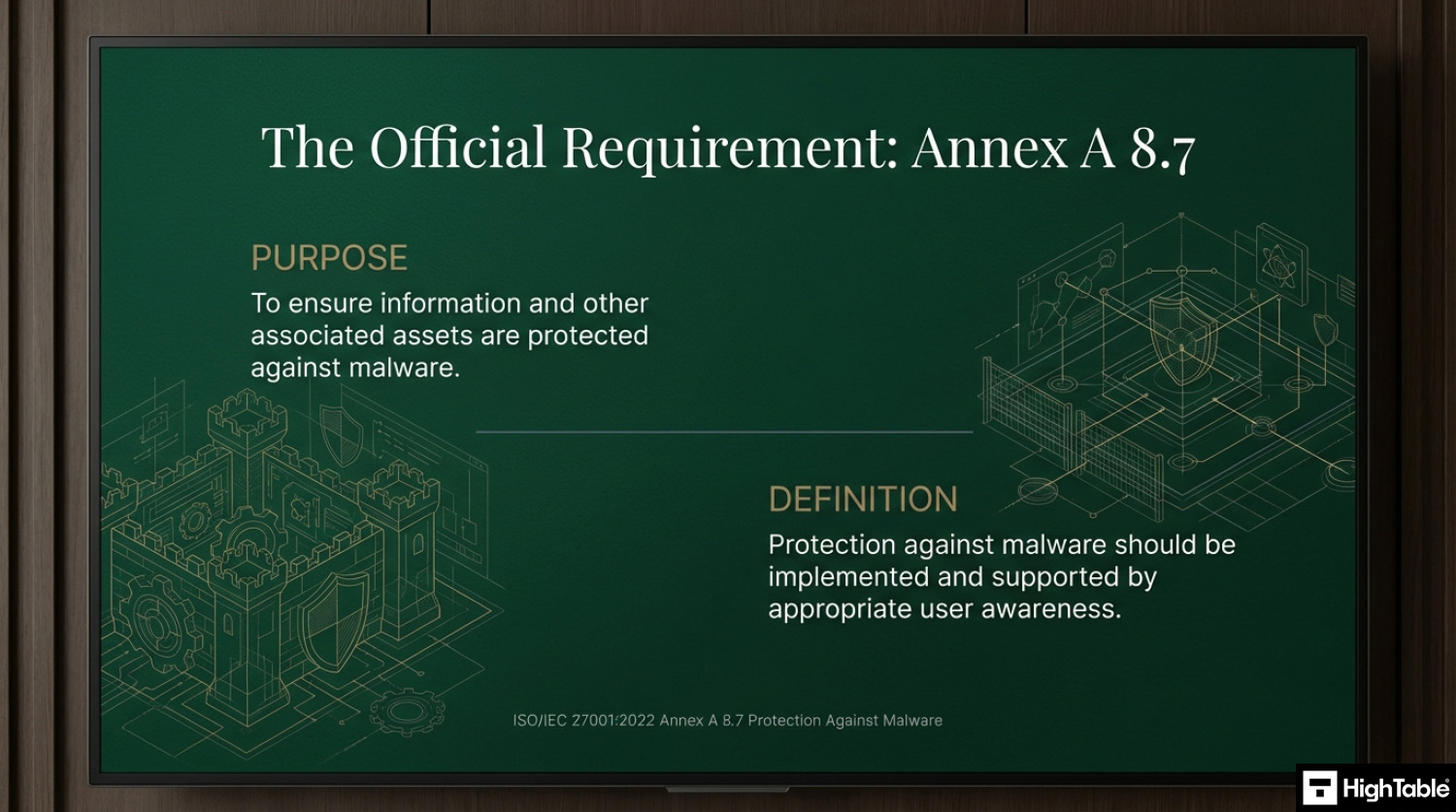
The purpose of ISO 27001 Annex A 8.7 Protection Against Malware is to ensure information and other associated assets are protected against malware.
ISO 27001 Annex A 8.7 Definition
The ISO 27001 standard defines ISO 27001 Annex A 8.7 as:
Protection against malware should be implemented and supported by appropriate user awareness.
ISO 27001:2022 Annex A 8.7 Protection Against Malware
ISO 27001 Annex A 8.7 Free Training Video
In the video ISO 27001 Protection Against Malware Explained – ISO27001:2022 Annex A 8.7 I show you how to implement it and how to pass the audit. Watch a step-by-step guide to implementing malware protection controls.
ISO 27001 Annex A 8.7 Explainer Video
In this beginner’s guide to ISO 27001 Annex A 8.7 Protection Against Malware, ISO 27001 Lead Auditor Stuart Barker and his team talk you through what it is, how to implement in and how to pass the audit. Free ISO 27001 training.
ISO 27001 Annex A 8.7 Podcast
In this episode: Lead Auditor Stuart Barker and team do a deep dive into the ISO 27001 Annex A 8.7 Protection Against Malware. The podcast explores what it is, why it is important and the path to compliance.
ISO 27001 Annex A 8.7 Implementation Guidance
With protection against malware we are looking a more holistic view than just having antivirus software. Of course antivirus software is a key component but that are a few other things that we need to consider.
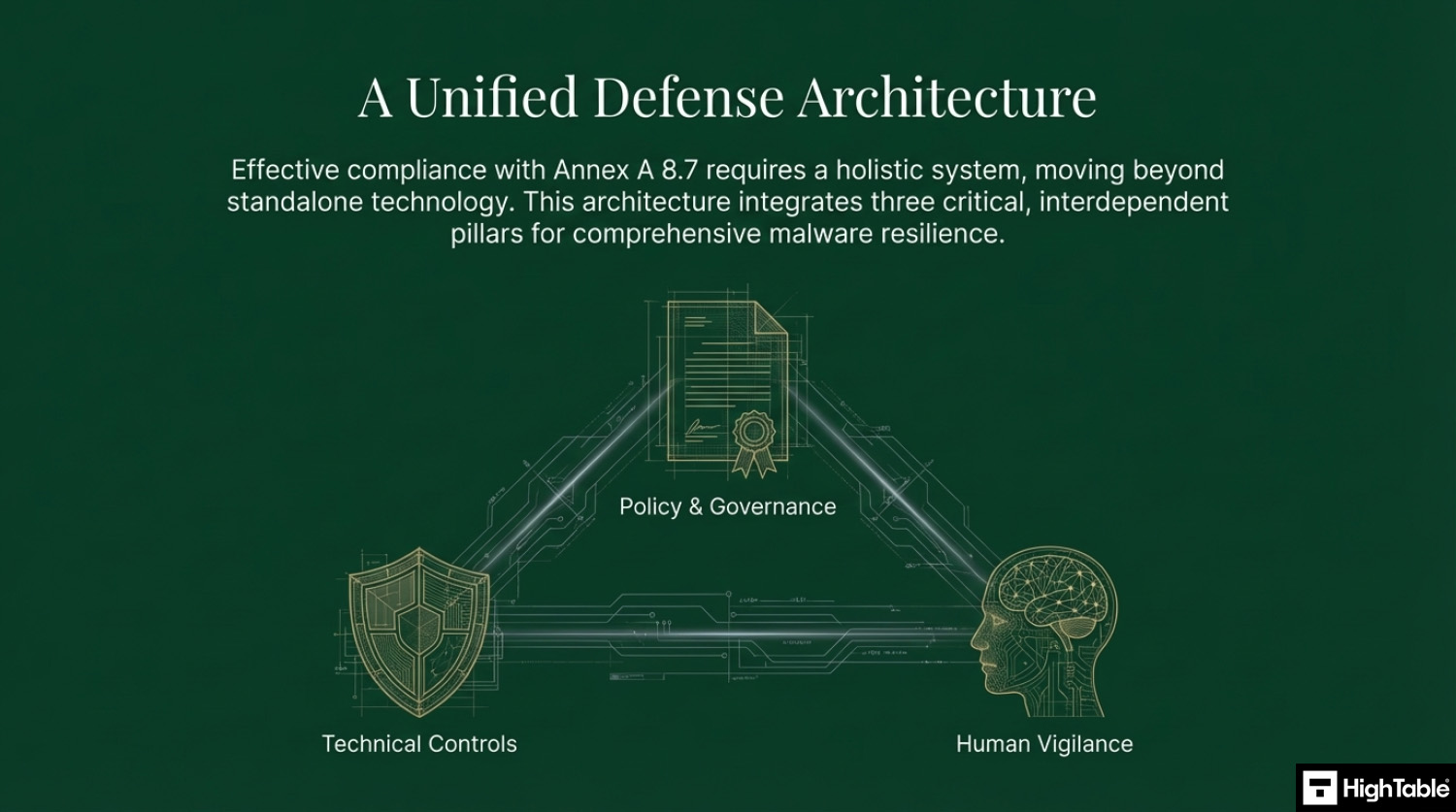
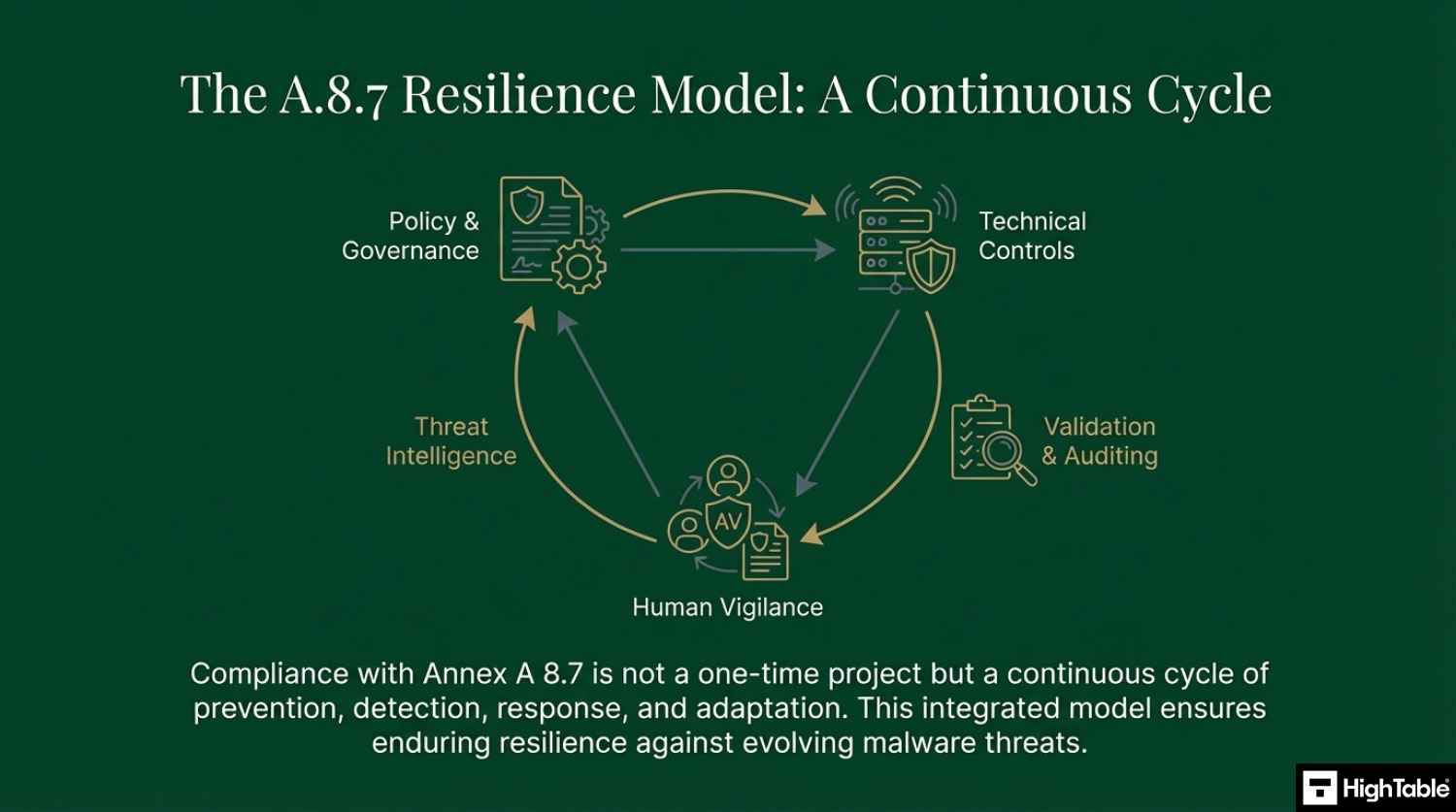
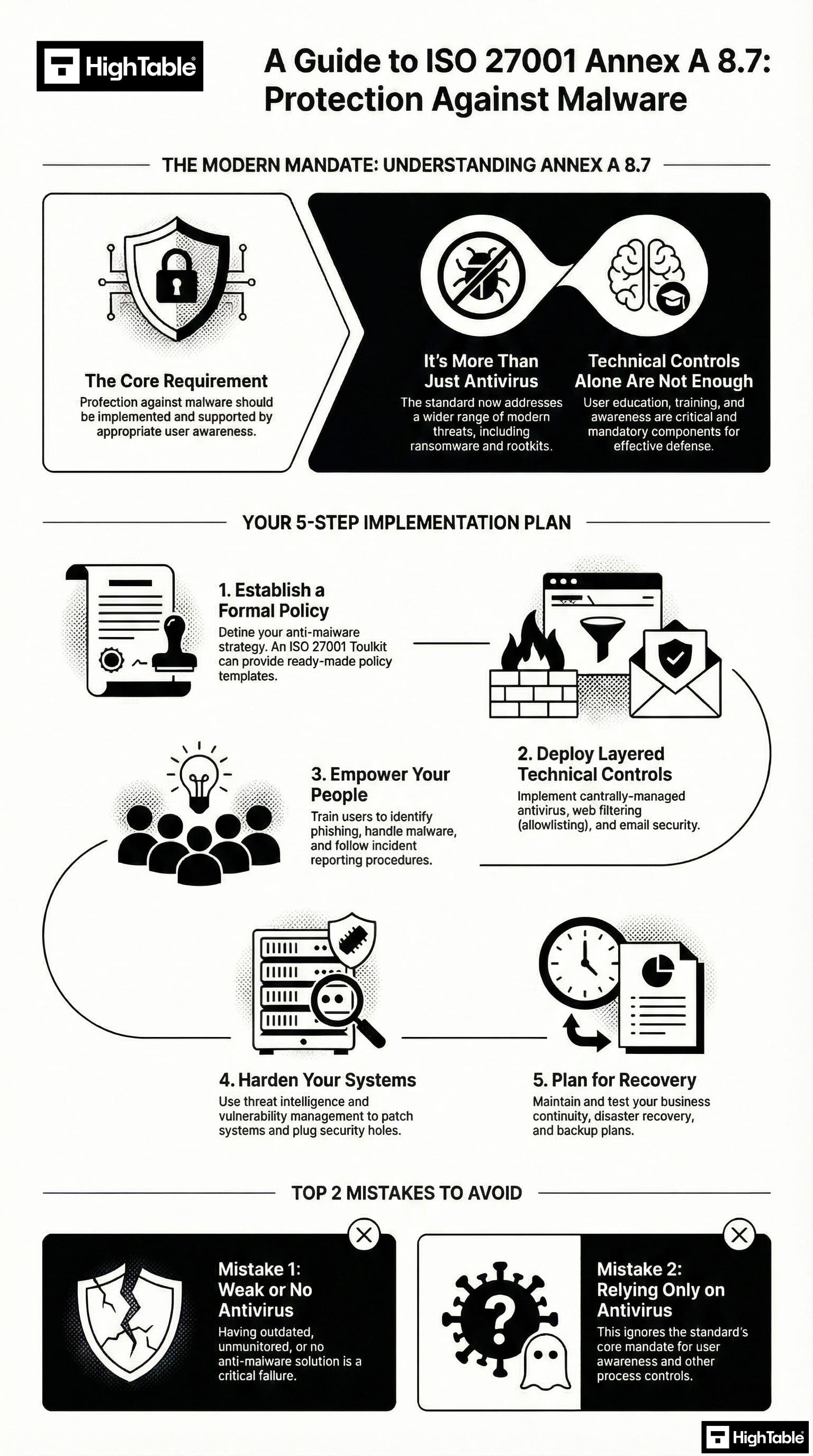
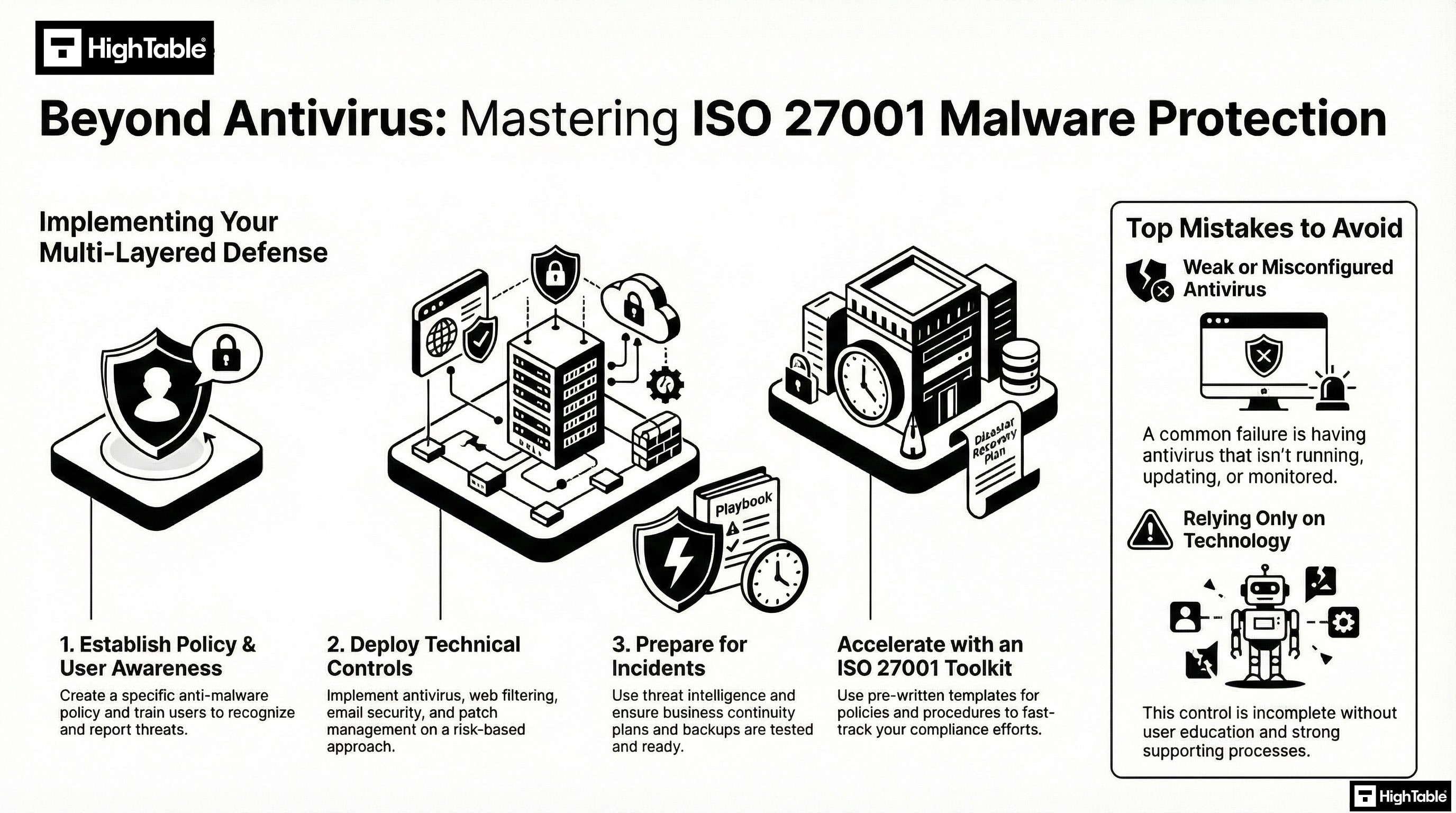
Implementing malware protection requires a multi-layered approach. The graphic below outlines the critical path from policy to technical controls.
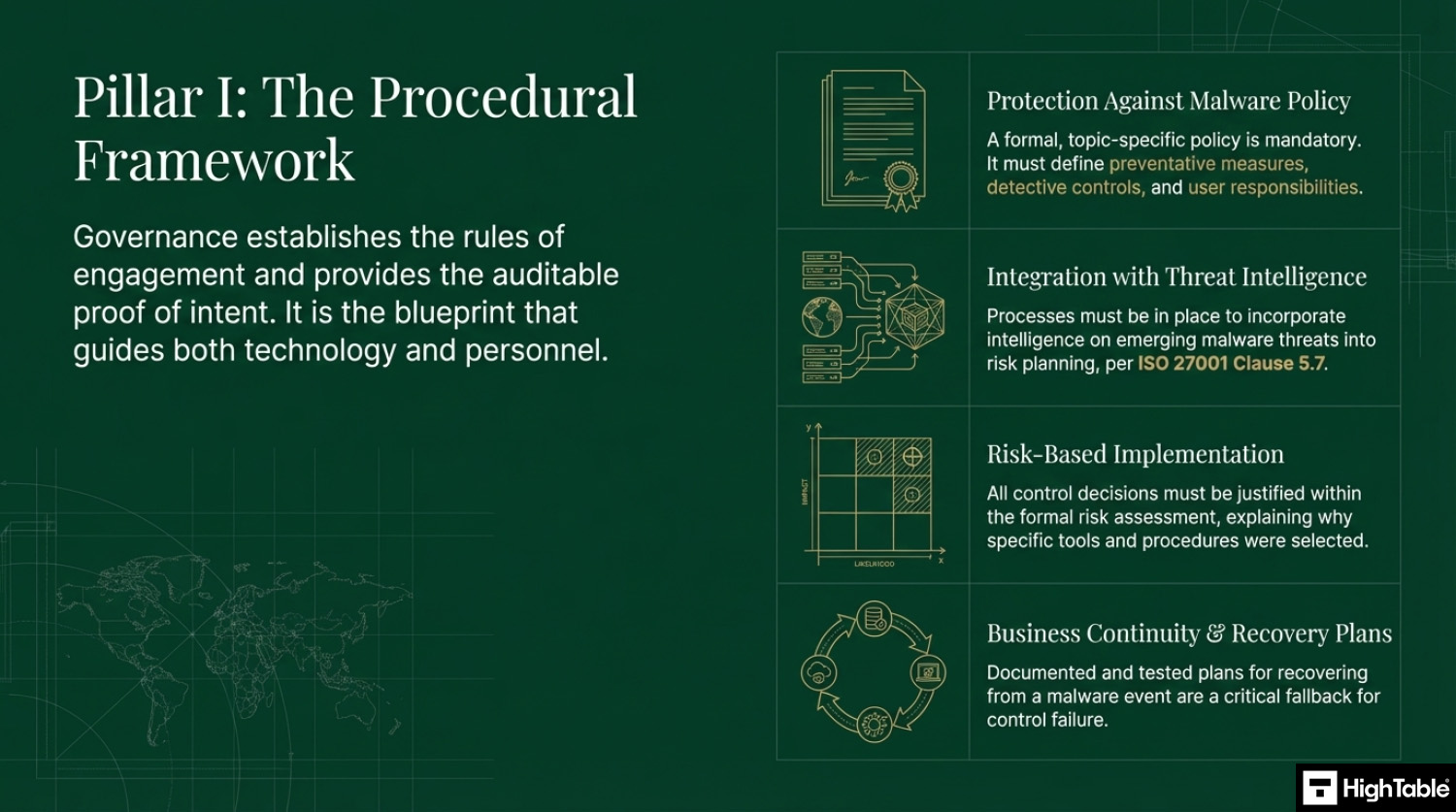
Implement the Governance Framework
Governance establishes the rules of engagement and provides auditable proof of intent. It is the blue print that guides people and technology.
Develop a Protection Against Malware Policy
A formal, topic-specific policy is mandatory and must define the preventive measures and detective controls as well as user responsibilities.
You are going to either write or download a topic specific Protection Against Malware Policy.
For further guidance read: ISO 27001 Protection Against Malware Policy Ultimate Guide
Integrating Threat Intelligence with Malware Protection
With the introduction of ISO 27001 clause 5.7 threat intelligence having access to bulletins, news letters and sources of information on emerging malware threats should be incorporated into processes and risk planning so that you can have a process of continual improvement that will seek to mitigate those threats.
Put in place Malware Recovery & Business Continuity Plans
Business continuity and the ability to recover from an event are an important part of the ISO 27001 standard and as fall back for a failure in this control. The usual rules on having a plan and testing the plan are in play here.
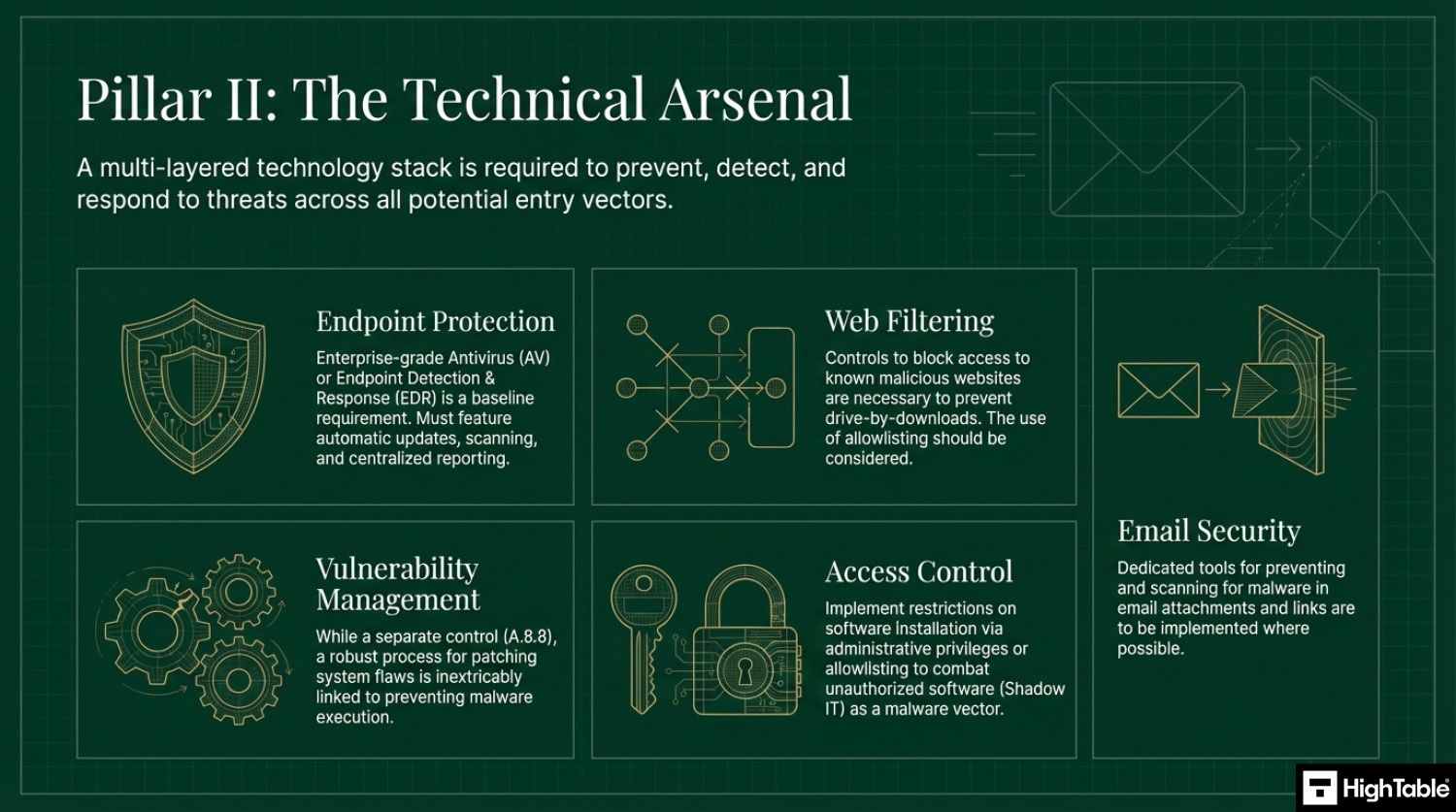
Implement the technical controls
Technology plays a key part in protection and a multilayered technology stack is required to prevent, detect and respond to threats.
Implement Endpoint Protection & Antivirus Software
A top 3 all time cyber security recommendation. This is in the territory of a no brainer. I cannot think of a compelling reason not to have antivirus software installed and running.
Having antivirus software installed that automatically updates, automatically updates definition files, automatically scans and repairs and reports back should be in place.
Blocking Malicious Websites & Drive-by Downloads
Ideally access to potentially malicious or dangerous should be blocked or managed. The use of allowlisting should be considered and combined with both policy and training.
Email Security & Attachment Scanning
Additional tools that support the prevention of, and scanning for, malware in emails are to be considered and implemented where possible.
Preventing Malware via Technical Vulnerability Management
Solid technical vulnerability management is part of the standard and links to this control by removing services that are not needed, blocking those not needed that cannot be removed and having solid configuration and technical management practices in place.
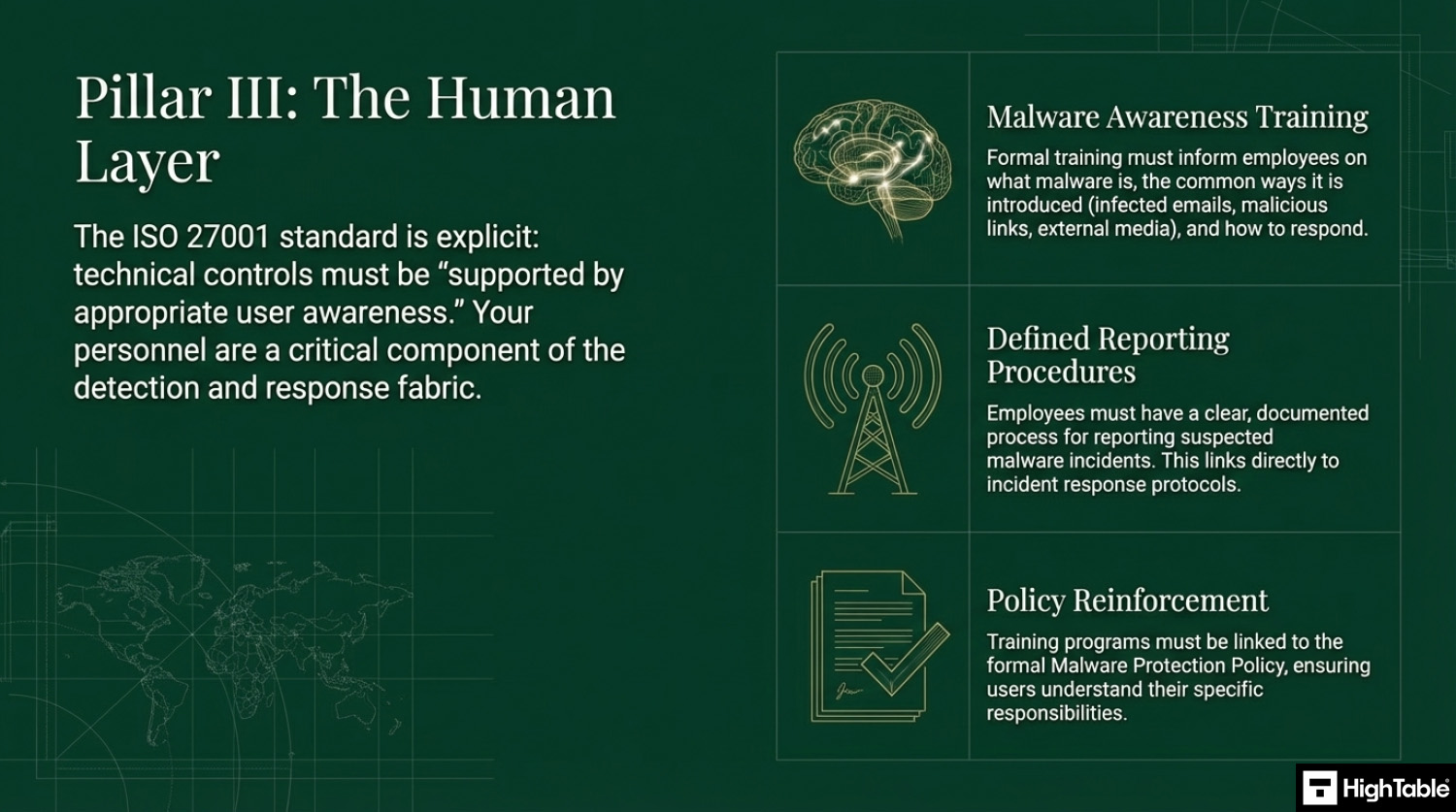
Implement the human controls
People are critical to detection and response and that standard is explicit on the need for training.
Malware Awareness Training & Education
As part of your information training you will implement training and awareness around malware. It will take the form of informing people of what it is, how to respond to it and general awareness on the ways that it can be introduced.
How to implement ISO 27001 Annex A 8.7
Protecting organisational assets against malware requires a multi-layered technical strategy that combines preventative controls with real-time detection and response capabilities. By following these action-oriented steps, your organisation can establish a robust defence-in-depth posture that satisfies ISO 27001 Annex A 8.7 requirements and mitigates the risk of ransomware, trojans, and zero-day exploits.
1. Formalise Anti-Malware Policies and Rules of Engagement
- Develop a formal “Malware Protection Policy” that mandates the use of approved security software across all endpoints, servers, and mobile devices.
- Draft a Rules of Engagement (ROE) document for the security team that outlines the technical procedures for isolating infected hosts and performing forensic investigations.
- Result: A documented governance framework that ensures consistent application of malware controls and provides legal standing for restrictive security measures.
2. Provision Next-Generation Antivirus (NGAV) and EDR
- Deploy Endpoint Detection and Response (EDR) agents to all organisational assets to provide behavioural-based detection alongside traditional signature-based scanning.
- Configure “Auto-Isolation” rules that programmatically quarantine devices exhibiting suspicious patterns, such as rapid file encryption or unauthorised lateral movement.
- Result: Proactive identification of advanced persistent threats (APTs) and the immediate containment of potential outbreaks.
3. Restrict Administrative Rights via Granular IAM and MFA
- Revoke local administrative privileges for standard user accounts to prevent the unauthorised execution of malicious binaries and scripts.
- Enforce Multi-Factor Authentication (MFA) and specific Identity and Access Management (IAM) roles for installing software or modifying system-level security configurations.
- Result: A significantly reduced attack surface where malware cannot easily gain the elevated permissions required for full system compromise.
4. Implement Network-Level Filtering and Mail Security
- Provision Secure Web Gateways (SWG) and DNS filtering to block access to known malware distribution domains and command-and-control (C2) servers.
- Deploy Advanced Threat Protection (ATP) for email services to automatically sandbox suspicious attachments and neutralise malicious URLs before they reach the inbox.
- Result: Prevention of the primary delivery vectors for malware, protecting users at the network and application layers.
5. Execute Continuous Scanning and Vulnerability Management
- Schedule automated, weekly full-system scans and real-time “On-Access” monitoring to detect and remove dormant malicious files.
- Integrate vulnerability scanning with your malware defence strategy to ensure that all systems are patched against the exploits commonly used for malware delivery.
- Result: A hardened environment where malware is identified quickly and the technical weaknesses it relies upon are systematically removed.
6. Integrate SIEM Logging and Incident Response Playbooks
- Configure all anti-malware solutions to export telemetry and “Infection Detected” alerts to a centralised SIEM platform for real-time correlation.
- Formalise malware-specific incident response playbooks that define the technical steps for data restoration from immutable backups and root-cause analysis.
- Result: Enhanced situational awareness and a verifiable audit trail for ISO 27001 compliance and regulatory reporting.
Malware Defence Stack
- Email Layer: Spam/Phishing Filter (e.g., Mimecast).
- Network Layer: Web Filtering / Firewall (Block bad URLs).
- Endpoint Layer: EDR / Anti-Virus (Stop the execution).
- Human Layer: Phishing Simulations (Don’t click the link).
- Recovery Layer: Immutable Backups (If all else fails).
I’ve sat in the Auditor’s chair for 30 years. Use the exact system and tools I use to guarantee a pass.

How to pass an ISO 27001 Annex A 8.7 audit
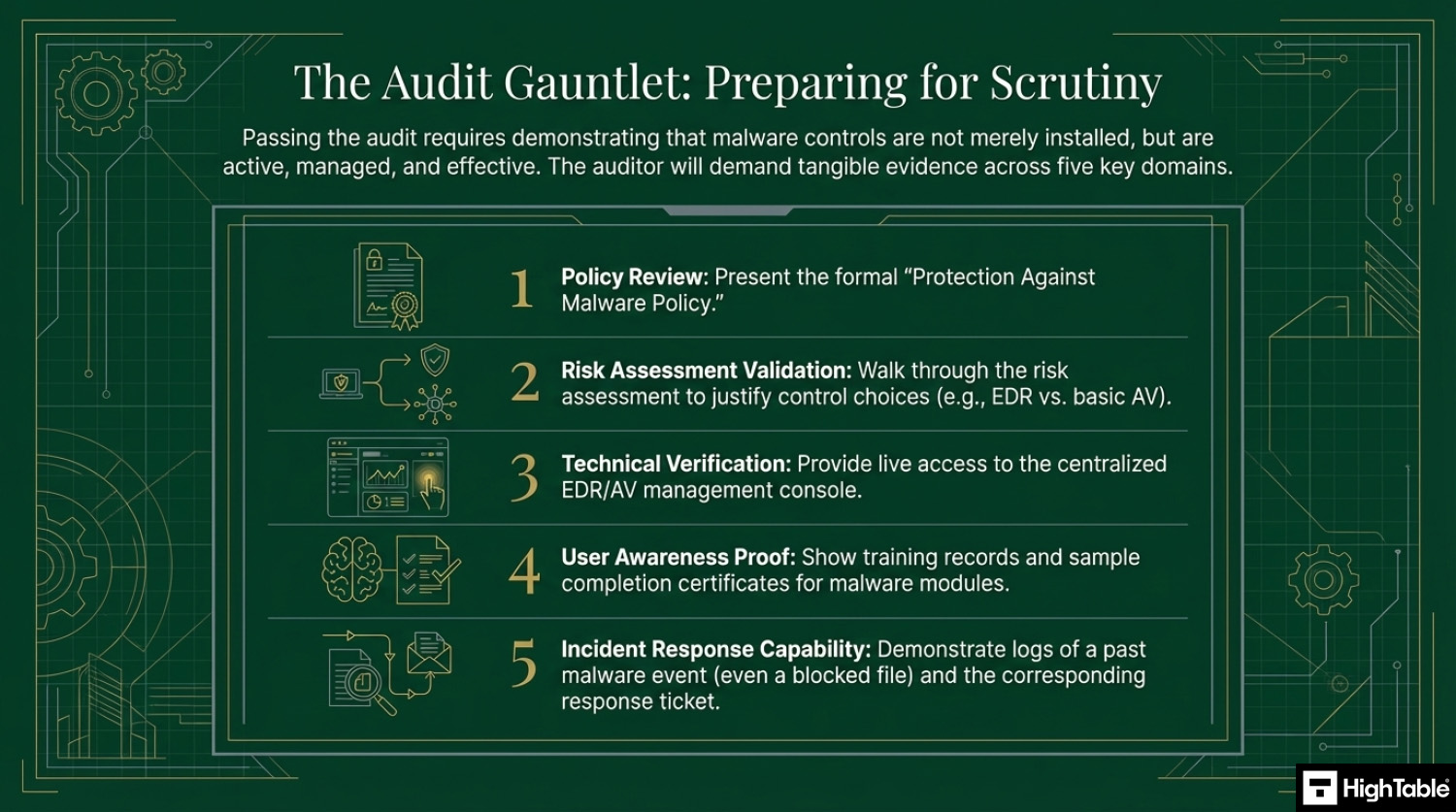
To pass the audit for Annex A 8.7, you must demonstrate to the auditor that your malware controls are not just installed, but active, managed, and effective. Use this checklist to prepare your evidence:
1. Present the Topic-Specific Policy
- Action: Show the auditor your Protection Against Malware Policy.
- Key Requirement: Ensure the policy explicitly covers preventative measures, detective controls, and user awareness.
2. Show Evidence of Risk-Based Decisions
- Action: Walk the auditor through your risk assessment.
- Key Requirement: Explain why you chose specific tools (e.g., EDR vs. basic Antivirus) based on the specific risks to your assets.
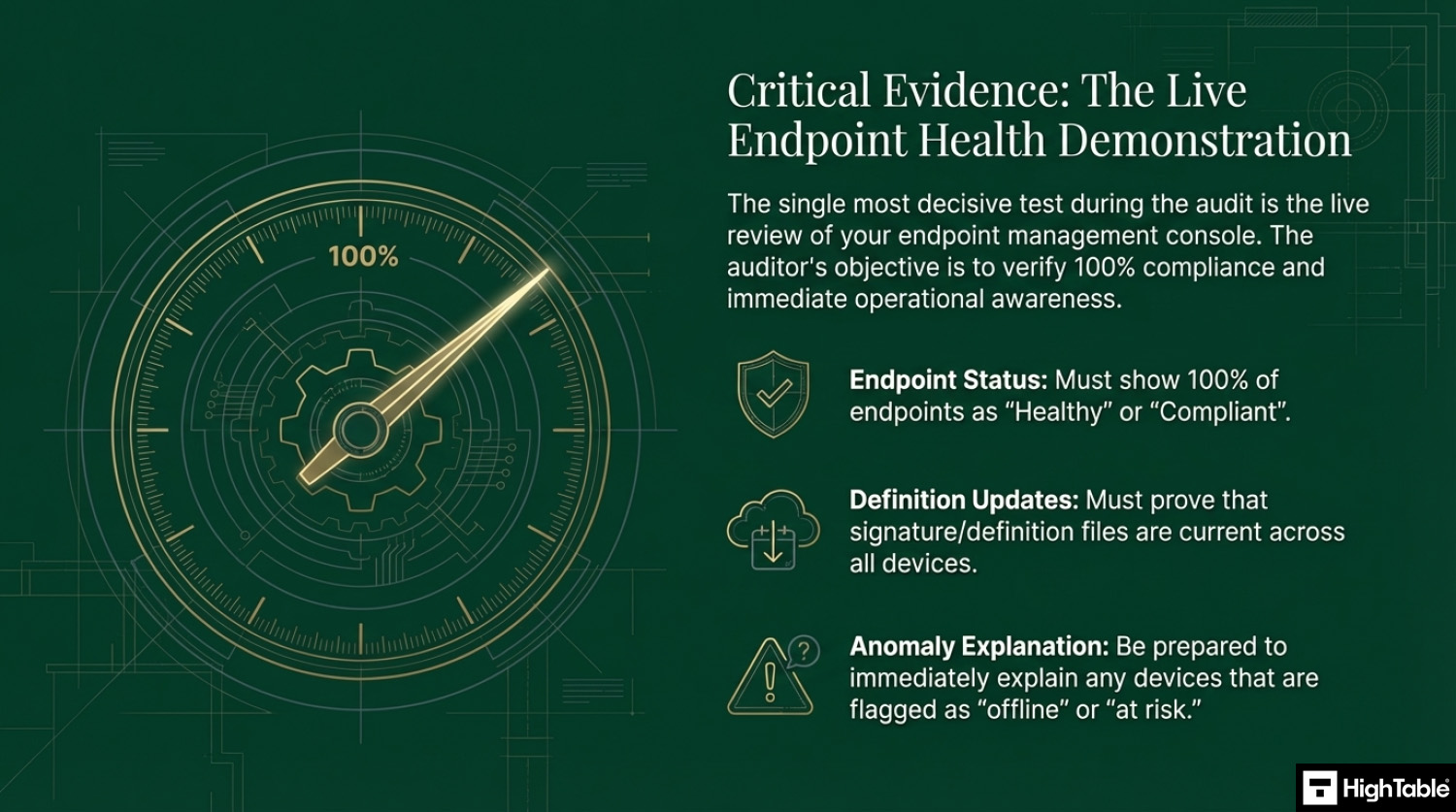
3. Demonstrate Technical Implementation (The “Live” Test)
- Action: Open your antivirus/EDR management console during the audit.
- Key Requirement: Show the dashboard proving 100% of endpoints are “Healthy” and “Up to Date.”
- Crucial: Be ready to explain any “red” or “offline” devices immediately.
4. Validate User Awareness Training
- Action: Provide training records.
- Key Requirement: Show a sample of employee completion certificates specifically for malware or phishing awareness modules.
5. Prove Incident Response Capabilities
- Action: Show a log of a past malware event (even a blocked file).
- Key Requirement: Demonstrate that the system alerted you, you investigated it, and the “Ticket” was closed.
Top 3 ISO 27001 Annex A 8.7 mistakes and how to avoid them
The top 3 mistakes people make for ISO 27001 Annex A 8.7 are
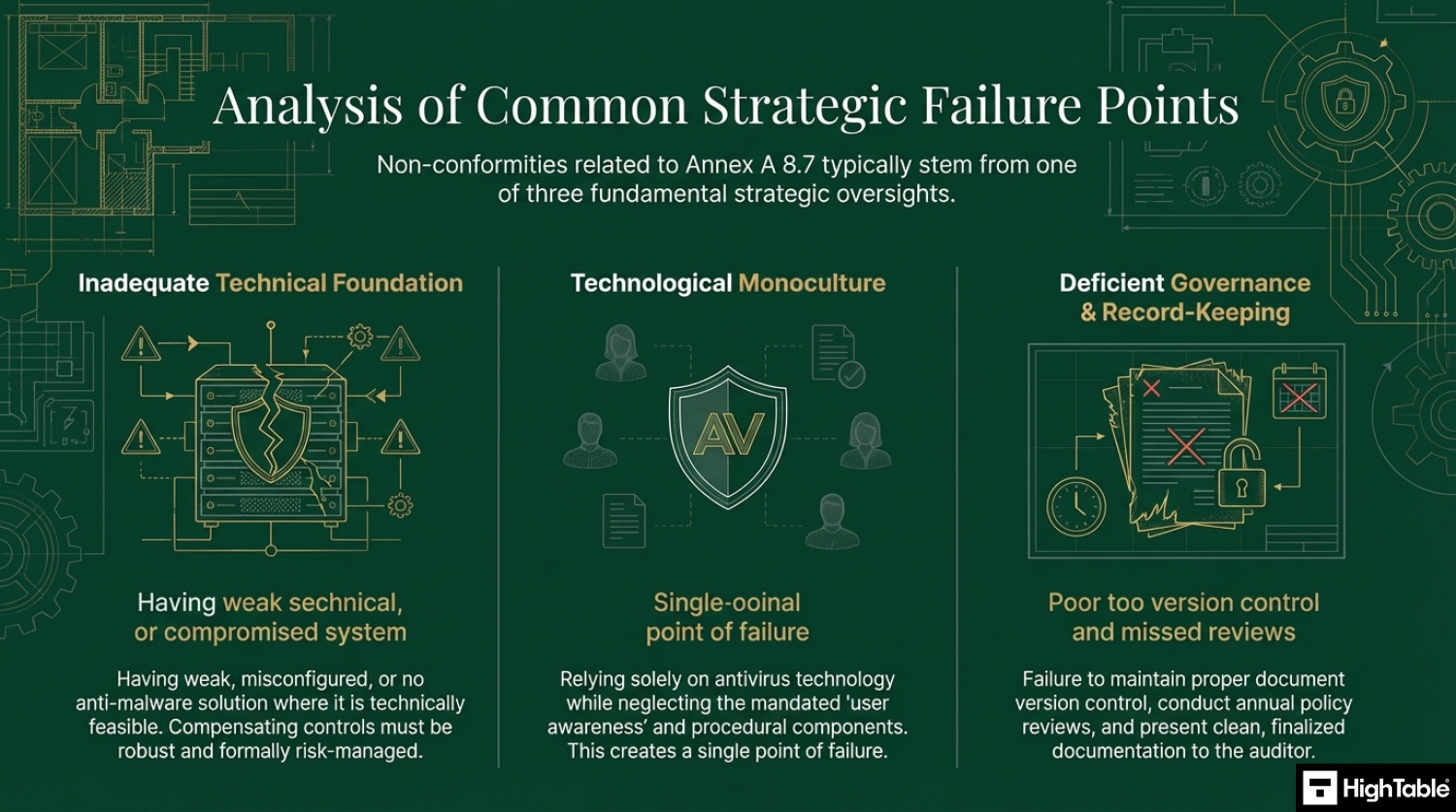
- Weak or no antivirus: A common mistake is having weak or no anti malware solution in place. There may be occasions where this is not possible and that is ok. You mange it with compensating controls and via risk management, but where it is possible it should be installed, operating and up to date.
- You rely only on antivirus :Another common mistake for this control is only relying on antivirus or anti malware technology. The control is specific about the support via education and user awareness. Be sure to incorporate education and awareness into your plans and consider the other guidance provided above.
- Your document and version control is wrong: Keeping your document version control up to date, making sure that version numbers match where used, having a review evidenced in the last 12 months, having documents that have no comments in are all good practices.
Applicability of ISO 27001 Annex A 8.7 across different business models.
| Business Type | Applicability | Examples of Control Implementation |
|---|---|---|
| Small Businesses | Highly applicable for protecting endpoints from common viruses and ransomware. Focus is on automated, low-maintenance tools and essential user education. |
|
| Tech Startups | Critical for protecting distributed teams and cloud-based development environments. Focus is on advanced detection (EDR) and email security. |
|
| AI Companies | Essential for securing high-performance compute clusters and ensuring training data integrity. Focus is on protecting Linux-based GPU nodes and preventing data poisoning. |
|
Fast Track ISO 27001 Annex A 8.7 Compliance with the ISO 27001 Toolkit
For ISO 27001 Annex A 8.7 (Protection against malware), the requirement is to ensure that information and assets are protected against malware through a combination of detection, prevention, and recovery controls, alongside user awareness.
| Compliance Factor | SaaS Compliance Platforms | High Table ISO 27001 Toolkit | Audit Evidence Example |
|---|---|---|---|
| Strategy Ownership | Rents you a proprietary dashboard for rules. If you cancel, your documented malware response and policies vanish. | Permanent Assets: You receive the Malware Protection Policy and procedures in Word/Excel to keep forever. | A localized Anti-Malware Policy defining scanning frequencies and alert thresholds stored on your internal server. |
| Technical Workflow | Often forces “integrations” that duplicate the alerts already present in Microsoft Defender, CrowdStrike, or SentinelOne. | Governance-First: Formalizes your existing EDR/AV technical settings into an auditor-ready framework. | A technical procedure document showing how automated updates and real-time scanning are enforced across the estate. |
| Cost Structure | Charges a “Success Tax” based on the number of endpoints or users, leading to ballooning monthly OpEx. | One-Off Fee: A single payment covers your governance documentation for 10 devices or 10,000. | Allocating budget to enterprise-grade EDR licenses rather than a monthly compliance “paperwork” subscription. |
| Stack Freedom | Limited by vendor “connectors”; switching AV/EDR providers requires reconfiguring the compliance platform. | 100% Agnostic: Standards adapt to any tool, whether you use open-source, cloud-native, or niche security products. | The ability to switch from one malware protection vendor to another without needing to pay for a new compliance module. |
The Tools We Use.
100% Audit Success. Zero AI Guesswork.

Summary: For Annex A 8.7, an auditor wants to see that you have a policy for malware protection and proof that your tools are active and managed. The High Table ISO 27001 Toolkit provides the governance framework to satisfy this requirement immediately. It is the most direct, cost-effective way to achieve compliance using permanent documentation that you own and control.
ISO 27001 Annex A 8.7 FAQ
What are the requirements for ISO 27001 Annex A 8.7?
ISO 27001 Annex A 8.7 requires a defense-in-depth approach to malware protection, combining technical controls with user awareness. Organizations must implement detection and prevention measures on all applicable systems and train users to recognize attacks.
- Technical Controls: Deploy antivirus or Endpoint Detection and Response (EDR) software on all endpoints.
- Automated Updates: Ensure signatures and definitions update automatically without user intervention.
- Web Filtering: Block access to known malicious domains and unauthorized file downloads.
- Policy enforcement: Prohibit the installation of unauthorized software by standard users.
Is antivirus software enough to comply with Annex A 8.7?
No, installing antivirus software alone is not sufficient for ISO 27001 Annex A 8.7 compliance. The standard explicitly mandates a holistic strategy that includes human behavioral controls and recovery plans, not just software.
- User Training: You must prove employees are trained to spot phishing and social engineering attacks.
- Change Management: You need controls to prevent unauthorized software installation (Shadow IT).
- Incident Response: You must have a documented procedure for reporting and recovering from a malware infection.
What evidence will an auditor ask for regarding malware protection?
Auditors typically request three specific types of evidence to verify your malware protection controls are active and effective. They focus on live system status rather than just static policy documents.
- Central Management Console: A live view of your antivirus dashboard showing 100% of agents are “Healthy” and updated.
- Training Records: Logs proving all staff have completed malware or phishing awareness training within the last 12 months.
- Incident Logs: Records of a blocked threat or investigated alert to demonstrate your response process works.
Do I need to install antivirus on Mac and Linux devices for ISO 27001?
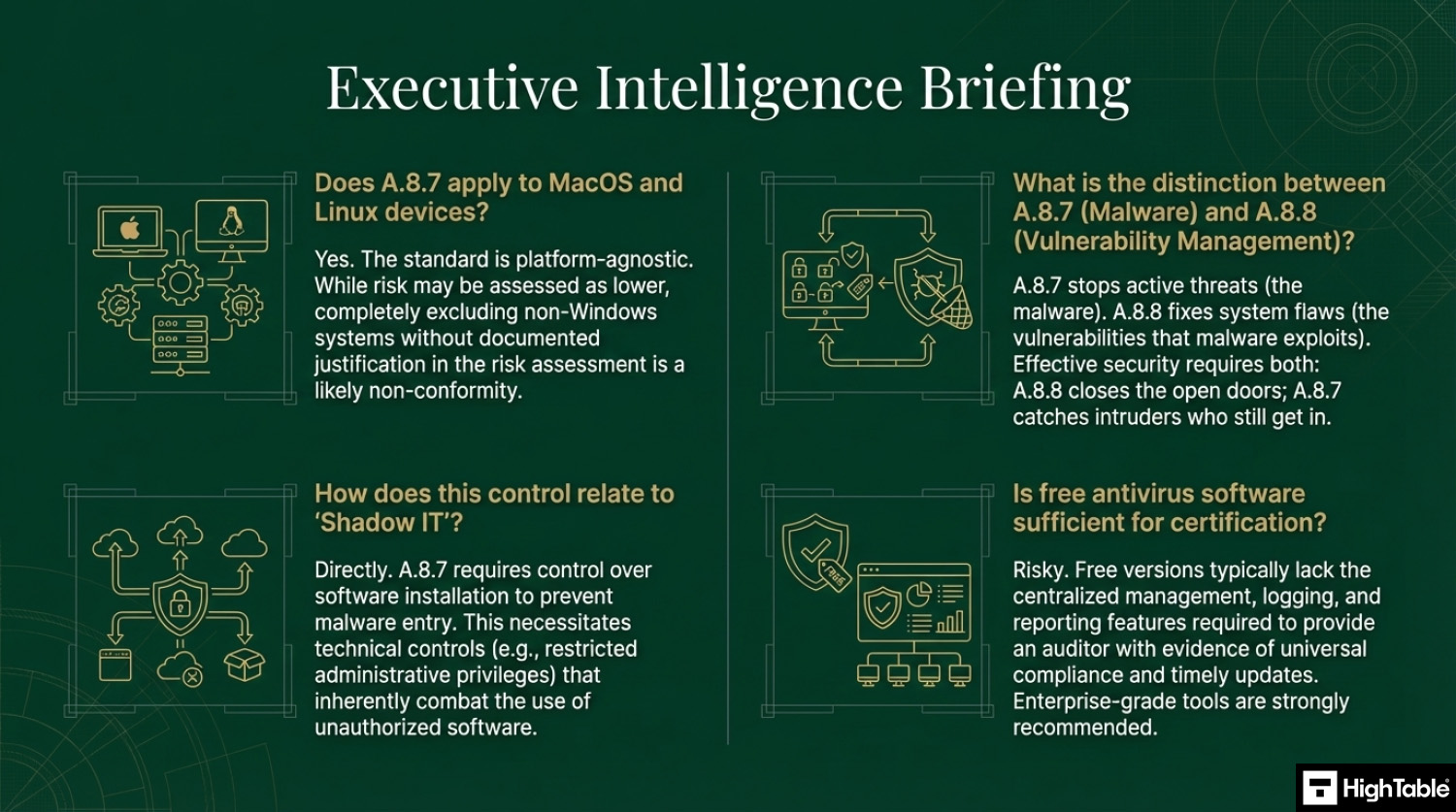
Yes, you must implement malware protection on Mac and Linux systems if they are within the scope of your ISMS. While these operating systems are often considered more secure than Windows, they are not immune to malware, and the standard requires risk-based protection for all endpoints.
- Mac OS: Deploy an EDR agent or enterprise antivirus solution.
- Linux Servers: Implement malware scanning or file integrity monitoring, especially for public-facing servers.
- Risk Assessment: If you choose not to install protection, you must formally document this decision in your risk assessment with a strong justification.
What is the difference between Antivirus and EDR for ISO 27001?
Antivirus is a preventive tool based on known signatures, while EDR (Endpoint Detection and Response) focuses on behavior-based detection and investigation. ISO 27001 does not strictly mandate EDR, but it is highly recommended for modern compliance.
- Antivirus: Blocks known file-based threats (e.g., stopping a specific virus file).
- EDR: Detects suspicious behaviors (e.g., a legitimate program trying to encrypt all your files) and allows for remote isolation of infected devices.
- Audit Advantage: EDR tools usually provide superior logging and reporting capabilities required for audit evidence.
How often should we conduct malware awareness training?
Malware awareness training should be conducted at least annually, but continuous micro-learning is the best practice. The ISO 27001 standard requires that users are made aware of their responsibilities, and infrequent training leaves organizations vulnerable to new attack methods.
- Onboarding: New hires should receive malware training immediately upon joining.
- Phishing Simulations: Run monthly or quarterly simulated attacks to test user vigilance.
- Triggered Training: Assign additional training automatically to users who fail phishing simulations.
Related ISO 27001 Controls
Further Reading
- ISO 27001 Data Protection Policy Template
- ISO 27001 Security Awareness Training Policy Beginner’s Guide
ISO 27001 Controls and Attribute Values
| Control type | Information security properties | Cybersecurity concepts | Operational capabilities | Security domains |
|---|---|---|---|---|
| Preventive | Availability | Protect | System and network Security | Protection |
| Detective | Integrity | Detect | Information_Protection | Defence |
| Corrective | Confidentiality |
ISO 27001 Annex A 8.7 Mind Map
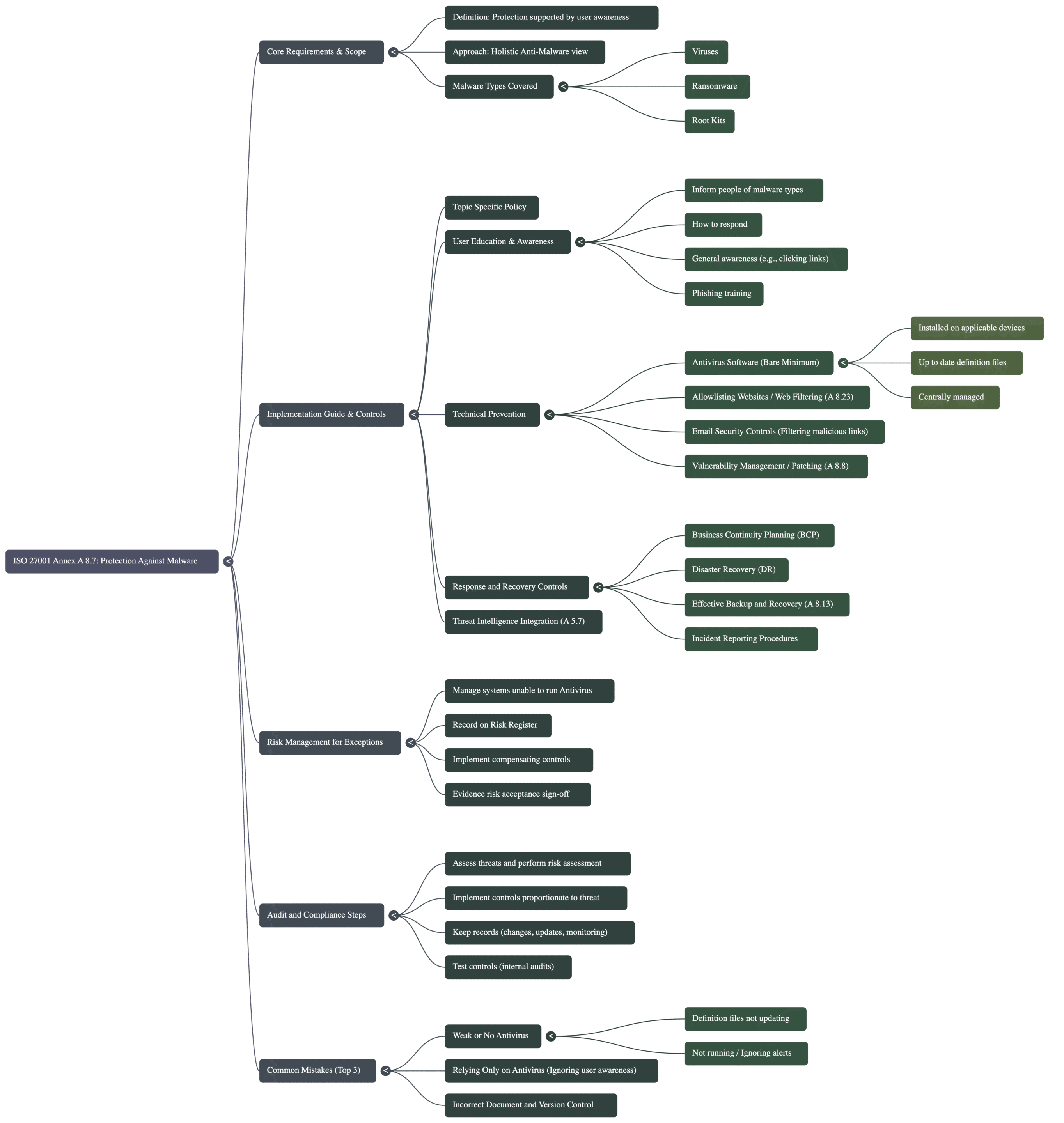
Navigating the requirements of ISO 27001 Annex A 8.7 goes beyond simply installing antivirus software; it requires a holistic approach that links policy, technical controls, and human behaviour. To help you visualise the complete compliance landscape, the mind map below breaks down the control into five actionable pillars, ranging from the initial scope definition to the ongoing audit process.
ISO 27001 Annex A 8.7 Strategic Briefing Slides
About the author
